
Technical Notes
Solvent TIJ Cartridge Storage, Shelf Life and Decap Time Explained
Store your solvent TIJ cartridge sealed, out of direct light, at room temperature, with the original cap on whenever it is out of the printer. Decap time decides your restarts: roughly 10–15 minutes before the nozzle plate dries. Here is the discipline that keeps a stop-start line running.
Store it sealed, capped and out of direct light — the rest is detail
Store the cartridge sealed, out of direct light, at room temperature, with the original cap fitted whenever it is out of the printer. Do not leave the nozzle plate exposed to air for extended periods. Those four clauses are solvent thermal inkjet (TIJ) cartridge storage in full — everything else here explains why each one matters and how to keep it on a busy line. On the line, the number that matters is decap time: our published approximation is that the head idles roughly 10–15 minutes on fast-dry solvent before the nozzle plate begins to dry — to be confirmed for the specific ink.
Lines that print in bursts plan a capping routine or a short purge at restart. Lines that run continuously mostly do not think about it. That is the whole article in one paragraph. What follows explains why solvent cartridges are fussier about storage and idle time than aqueous ones, gives the storage rules, explains what decap time is and what moves it, sets out idle-handling routines for different line patterns, and ends with the troubleshooting order for the complaint every stop-start line eventually makes — the first print after a pause is faint.
If you are new to the category, what a solvent TIJ cartridge is covers the basics, and how the sealed assembly is built and tested covers the factory side.
Why solvent cartridges are fussier about storage and idle time
The same property that makes solvent ink work is what makes it demanding in storage: the carrier evaporates fast. On the product that is the point — typically dry to the touch in 1–5 seconds on non-porous surfaces, so products can be packed or shrink-wrapped shortly after printing. But evaporation does not stop at the product. It happens at the nozzle plate too, whenever the plate sits open and idle.
An aqueous cartridge on a carton line can sit uncapped through a coffee break and print fine. A solvent cartridge cannot be treated that way, because its ink is designed to leave quickly. This is not a defect; it is the trade for printing on metal, glass and plastic where water-based ink beads up and wipes off. The discipline it asks for is small — cap on, sealed storage, a purge routine — and this article is that discipline written down.
Our solvent ink is a mild-solvent formulation: the lower-aggression end of the solvent family, chosen to wet hard-to-wet surfaces and to survive pauses rather than to dry as fast as possible. That direction, shared with the HP 2580 system our XM-45S is placed in, is deliberately pause-tolerant — but “pause-tolerant” is not “idle-proof”, and the rest of this article draws that line precisely.
The storage rules: four things that decide whether the cartridge is good next month
The product page states the rule in one row, and it is worth quoting exactly: store sealed, out of direct light, at room temperature. Do not leave the nozzle plate exposed to air for extended periods; fit the original cap when the cartridge is out of the printer. Four rules follow from it.
Keep it sealed until use. The factory seal is what holds the storage life. A cartridge is a sealed assembly — reservoir, filter and printhead in one — and the seal is part of the product, not packaging waste. Do not break the seal “to check” a cartridge you are not about to install.
Room temperature, out of direct light. Heat accelerates evaporation and ages ink; direct sunlight adds heat and UV. A normal storeroom shelf is right; a windowsill, a spot above a heater, or a container left in summer sun is wrong.
Cap on whenever it is out of the printer. The original cap exists for one job: covering the nozzle plate. Any time the cartridge is out of the machine and not printing — between shifts, during a line changeover, while waiting as a spare — the cap goes on. This is the single cheapest life-extension available.
First in, first out. Rotate stock so the oldest sealed cartridges are used first. Check the date on the box and use the earliest dates first, the way any consumable with a stated storage life is handled.
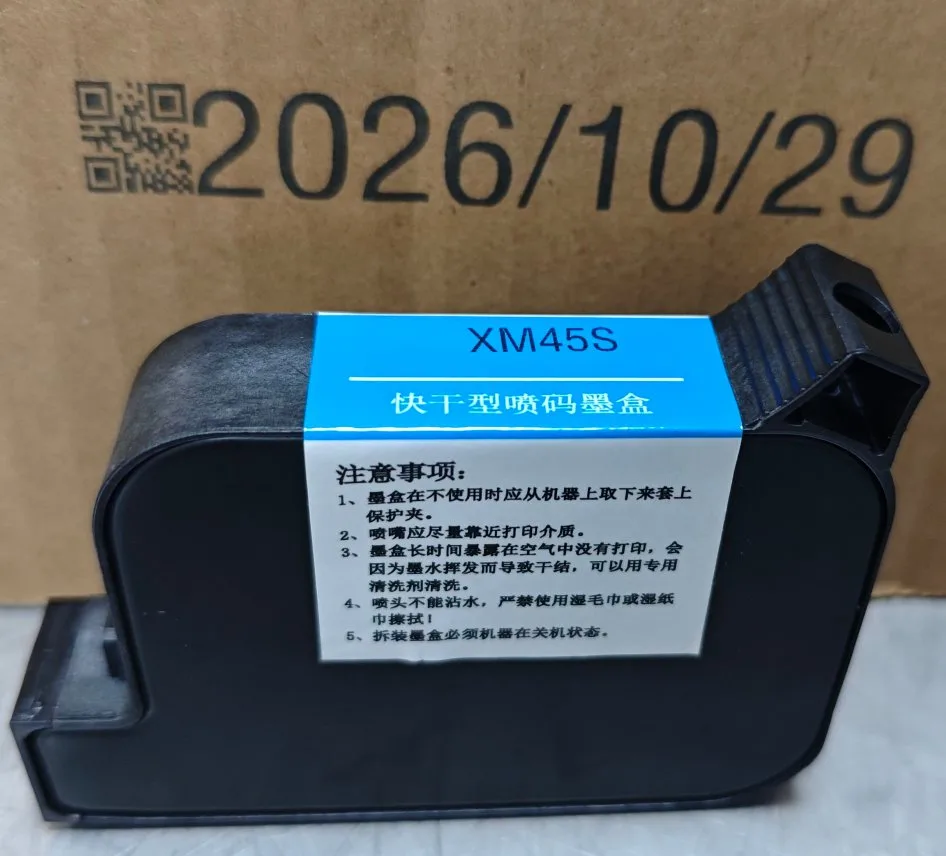
The published operating envelope for the cartridge is 15–35 °C and 35–80% relative humidity, non-condensing. That envelope describes the line while printing; for storage, the product page’s own wording — room temperature, out of direct light — is the rule, and we do not extend it beyond what is published. If your storeroom is hotter than your hall, that is a storage condition you should fix before blaming the cartridge.
Five questions walk the whole rule, and they take one visit to the storeroom:
- Is the shelf out of direct sun for the whole day, not just at the hour you looked?
- Is there a heater, a compressor or a drying oven within a metre of it?
- Are opened cartridges capped and off the bench, not standing loose beside the machine?
- Can you tell, without opening a box, which cartridges are oldest?
- Does anyone actually know this routine, or does it live in one person’s head?
Question four and question five are the ones that fail quietly. A storeroom that passes all five will not produce many storage complaints, and a line that fails one of them will produce them indefinitely, whatever the ink.
Shelf life: what the term means, and what we will not put a number on
Cartridge shelf life is how long a sealed cartridge stays usable in storage. Working life is how many prints it delivers on your line — and that depends on what you print, as set out in the cost-per-1000-prints article. The two get mixed up routinely, and only the first belongs in this section.
Here is the honest position. The sealed storage life in months, per ink, is not published yet; it varies by ink formulation and belongs on the cartridge packaging and datasheet for the ink you actually bought. We are not going to publish a generic months figure, because a generic figure would be the wrong kind of promise: a mild-solvent black and a white solvent ink do not age identically, and the number that matters is the one for your ink under the storage conditions above. Check the date on the box, store per the four rules, rotate first-in-first-out, and treat any months figure quoted without its ink and its conditions the way you would treat a prints-per-cartridge figure quoted without its message — as not plannable.
What storage does not do is worth stating too. Proper storage preserves a cartridge; it does not rejuvenate one. A cartridge that has sat uncapped on a bench for a week is not fixed by fitting the cap afterwards — the evaporation already happened at the nozzle plate. The cap prevents the loss; it does not reverse it.
Three ways storage goes wrong in practice, none of which shows up until the cartridge is installed:
The showcase shelf. A cartridge left on a windowsill or on top of a control cabinet is getting heat and light for months. The box looks perfect; the ink inside has been ageing the whole time.
The helpful inspection. Someone breaks the seal to look at a spare, then puts it back in the box without the cap fully seated. The seal is one-way: it protected the cartridge until the moment it was opened, and after that only the cap is doing the work.
The cold-store handover. A cartridge moved from an air-conditioned store into a warm, humid hall can pick up condensation on the plate and on the contacts. Let it reach hall temperature in its packaging before installing it, and do not wipe the plate with anything you would not put on a lens.
None of these is an ink problem, and all three present as one — which is why the storage history is the first thing to establish when a cartridge misbehaves.
Decap time: the number that runs your idle discipline
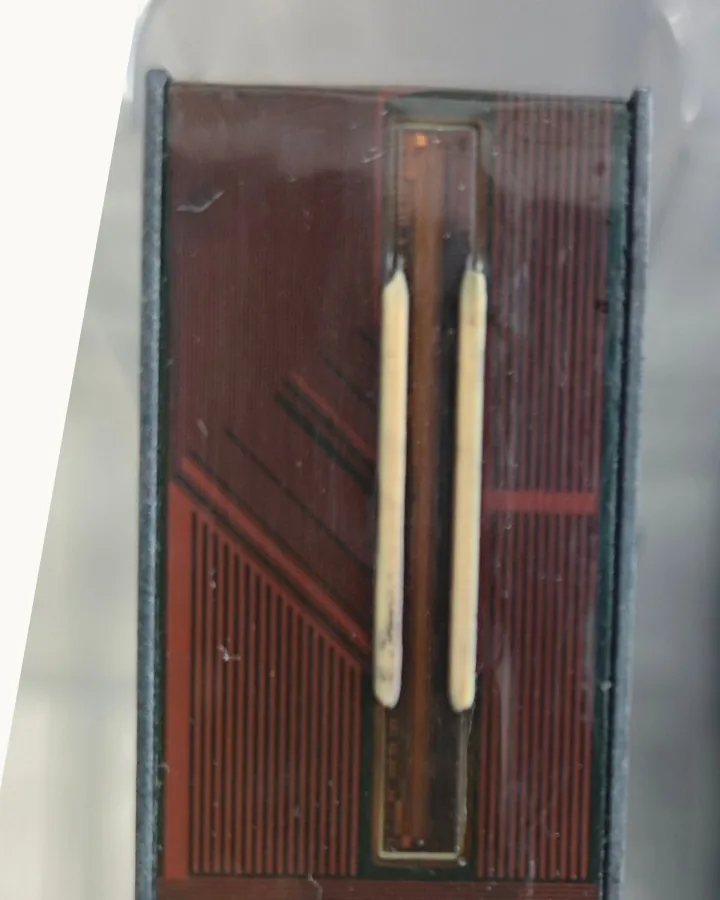
Decap time is how long the printhead can sit uncapped and idle before the nozzle plate starts to dry — before the first print after the pause needs a purge or a wipe to come back clean. It is the single most practical number for any line that stops and starts, because it decides whether a pause is free or costs you a restart routine. Nozzle plate drying is the physical event underneath the number, and it begins before the print looks wrong.
Our published figure: the head idles roughly 10–15 minutes on fast-dry solvent before the nozzle plate begins to dry — to be confirmed for the specific ink. Read that sentence carefully, because every word is load-bearing. “Roughly” and “begins to dry” mean this is the start of degradation, not a cliff edge; some nozzles weaken before others. “On fast-dry solvent” means it is a class approximation, not a per-ink measurement. And “to be confirmed for the specific ink” is the part buyers skip: the per-ink, per-condition decap range is still pending factory test data at stated temperature and humidity, and until it lands the 10–15 minute band is a planning approximation, not a specification.
What a dried nozzle plate actually looks like is worth one sentence, because it explains why the fix is a purge and not a cartridge change: the ink at the plate loses its carrier and leaves pigment and resin behind, partly blocking the orifice. Fresh ink pushed through from behind re-wets it. That is all a purge is.
What moves decap time, in order of practical importance
Temperature and humidity. Warmer air and lower humidity accelerate evaporation at the nozzle plate. The published operating envelope is 15–35 °C and 35–80% RH — a hot, dry hall is the worst case for decap, and the per-ink confirmation should be read against your hall conditions, not a lab’s.
The ink direction. A fast-dry ink dries fast on the product and at the idle nozzle plate; it is the same evaporation measured twice. Our mild-solvent direction is formulated toward surviving pauses rather than drying as fast as possible, which is why the 2580-system placement matters: long decap is the headline property of that system, as set out in HP 2580 vs HP 2590 vs Xinmo XM-45S. But direction is not immunity.
The pause pattern. Decap is about the longest gap, not the average one. A line that pauses two minutes every ten lives inside the approximation; a line that pauses forty minutes for a material change lives outside it. Plan against your longest normal gap.
Airflow over the plate. A printhead parked in a draught dries faster than one parked still. Where the head sits during a pause is part of the answer, and it is free to change.
Whether the cap is actually used. This one outranks the other four. A capped head is not depending on decap time at all, and no ink formulation compensates for a routine nobody follows.
| Situation | What to do |
|---|---|
| Pause under about 10 minutes, normal hall | Resume and check the first print; purge only if it is faint |
| Pause over about 10–15 minutes, or a hot, dry hall | Cap the head during the pause, or plan a short purge at restart |
| Overnight or weekend shutdown | Cap the head; purge and test-print at restart before production |
| First print faint after any pause | Purge or wipe once, reprint — do not keep running faint codes |
Idle handling by line pattern
Idle handling on a TIJ line is not one routine but three, and which one you need is decided by the pattern your line runs rather than by the ink you bought.
Continuous lines barely need this section. If the head fires steadily, the nozzles never sit idle long enough for decap to matter. The discipline sits only at the edges: cap during product changeovers and breaks, and purge at restart if the first print looks faint.
Burst lines — print, stop, wait, print again — live on decap time. This is the pattern the model-comparison article describes as the 2580’s home ground: intermittent lines on foil, blister and hard-to-wet materials, where the cartridge has to survive the pauses. The routine is a choice between two disciplines. Cap the head at every pause longer than your confirmed decap band, or accept a short purge at every restart and cost it into the shift. What you cannot do is neither: an uncapped head through a thirty-minute pause followed by immediate production is how a faint first print becomes a shift-long argument about the ink.
Capping discipline is the whole game, and it is a management question rather than a technical one. A cartridge that is capped when idle is not depending on decap at all. Decide which discipline your operators will actually follow — capping at every pause, or purge at every restart — and then test that one on your line. The routine that fails is always the one nobody follows.
Before you choose, measure the input. Walk the shift and write down the three longest pauses a normal day produces: the lunch break, the material changeover, the wait for the next pallet. Most lines find that two of the three are far longer than anyone assumed and one is shorter. That list, not the average pause, is what your capping rule has to cover — and it is the same list we will ask you for if a faint-print complaint ever comes back to us.
A shift routine that fits on one card
Written routines survive shift changes; verbal ones do not. The whole discipline fits on a card the operator can see from the machine, and it reads roughly like this:
- Cartridge out of the printer, cap on. No cartridge stands on the bench uncapped, ever.
- Pause longer than the confirmed decap band: cap at the pause, not at the restart.
- Restart after a long pause: purge, then a test print, then production.
- First print faint: purge once and reprint. Do not run faint codes to keep the line moving.
- End of shift: cap, log the longest pause, and put the spare back in the box sealed and capped.
Two notes on that card. It says “the confirmed decap band” rather than a fixed number on purpose — until the per-ink figure is confirmed, each line sets its own conservative threshold from the 10–15 minute class approximation, and a hot, dry hall should shorten it. And the fourth line matters commercially as much as the first: a faint code that ships is a rework or a recall, while a two-minute purge is a rounding error on the shift.
Troubleshooting: the first print after a pause is faint
When it happens, work in this order.
Purge or wipe once, then reprint. Most cases end here. A short purge clears the dried ink at the plate and the nozzles recover.
Check the cap discipline. Was the head capped during the pause? How long was it open, at what hall temperature? If the pause exceeded the decap band uncapped, the faint print is the expected result, not a fault.
Check the surface, not just the ink. If prints are faint or patchy beyond the first print, work through the substrate checks in the adhesion guide before blaming the cartridge — residue, condensation and low surface energy cause more “ink failures” than ink does.
Then talk to us. Send the pause pattern (longest gap, hall temperature and humidity), the ink and cartridge model, and a photo of the faint print. If the cartridge is within its storage life, stored per the four rules, and still will not recover after a purge, that is our problem to investigate — and the 30-day refund commitment on the pricing page is the backstop if the goods do not match the published description.
The order is designed to separate three causes that all look like “the ink is bad”. If a purge fixes it, the cause was idle exposure at the plate. If it prints well on one material and badly on another, the cause is the surface, not the cartridge. If it stays faint through a purge on a material that has printed well before, then it is the cartridge or the ink, and that is the case worth sending to us with the details above. Skipping straight to a cartridge replacement is the expensive way to run that test, and it hides the cause instead of finding it.
Questions buyers ask about storage and decap
How long can a sealed solvent TIJ cartridge be stored?
The sealed storage life in months varies by ink formulation and is stated on the cartridge packaging and datasheet — to be confirmed per ink, and we do not publish a generic figure. What is generic is the storage discipline: sealed, out of direct light, at room temperature, first-in-first-out. A cartridge stored that way holds its stated life; one stored on a sunny windowsill may not, whatever the printed months say.
Can I leave the cartridge in the printer uncapped overnight?
No. Fit the original cap whenever the cartridge is out of active printing — overnight and weekend shutdowns included. At restart, purge and run a test print before production. An uncapped nozzle plate overnight is the longest idle gap your line will ever see, and the purge you skip is the faint first-print run you explain afterwards.
What exactly is decap time?
How long the printhead can sit uncapped and idle before the nozzle plate starts to dry. Our published approximation is roughly 10–15 minutes on fast-dry solvent, to be confirmed for the specific ink — the per-ink range at stated temperature and humidity is pending factory test data. Plan your capping and purge routine against your longest normal pause, not the average.
Does a mild-solvent ink need less idle discipline than a fast-dry solvent?
Less, not none. The mild-solvent direction — ours, and the HP 2580 system our XM-45S is placed in — is formulated to survive pauses rather than to dry as fast as possible, so its decap behaviour is the tolerant end of the solvent family. But evaporation still happens at an open nozzle plate. Cap during long pauses regardless of ink direction. The solvent cartridge page states the storage row and the operating envelope these answers come from.
The cartridge was stored sealed and capped, but the first prints are weak. Is it dead?
Not necessarily. Run a purge and a test print first — nozzles often recover once dried ink at the plate is cleared. If it does not recover, check the storage history (heat, light, seal integrity) and the date on the box. If storage was per the rules and the cartridge is within its stated life, contact us with the details — see the troubleshooting order above.
Does humidity in the hall affect the cartridge?
The published operating envelope is 15–35 °C and 35–80% relative humidity, non-condensing. Within it, the cartridge prints as published. At the dry end of that band, especially combined with heat, expect decap to arrive sooner — which is another reason the per-ink decap confirmation should be read against your hall conditions rather than a lab’s.
What this changes on your line
Storage and decap are the same subject seen from two distances: storage is what happens to the cartridge between factory and printer, decap is what happens to the nozzle plate between prints. The rules are short — sealed, out of direct light, room temperature, cap on whenever idle, first-in-first-out — and the number to plan around is the decap band: roughly 10–15 minutes on fast-dry solvent, to be confirmed per ink, with your longest pause as the planning input and a capping-or-purge routine as the answer.
The sealed storage life in months and the per-ink decap range are the two figures still to be confirmed with factory test data, and they will be added to the two places above that say so, in the same edit as this section. Everything else on this page is published and plannable today. That matters commercially, because a supplier who will not quote a figure is easier to trust than one who quotes a figure without its conditions — the same test we would want applied to us, and the reason our manufacturer page is written the way it is.
One step outranks both figures. Before any quantity order, print a sample on your own material: contact us with the substrate, the line speed and the code content, and run the result the way your line will actually run it — including the pauses. Storage discipline keeps a cartridge good until you use it; the sample is what tells you whether it is good enough for your product.
Related reading
- 28 October 2026
HP 2580 vs 2590 vs XM-45S: Which Solvent TIJ Cartridge Fits Your Line?
The number on the label decides three separate things — ink behaviour, chip and print height — and they do not…
- 13 November 2026
How to Check TIJ Cartridge Compatibility Before Ordering
Most compatibility problems are information problems: the buyer sends a part number, the supplier answers the …
- 5 November 2026
Solvent vs Water-Based TIJ Ink: What Decides Which One You Need
Water and solvent are two carriers, and the carrier decides which surfaces an ink will wet, how long it takes …
Want this confirmed on your own material?
We print on samples of your actual substrate and send them to you. Send the material, the line speed and the code content, and we will tell you honestly whether the fault is the ink, the surface or the line layout.